Overview
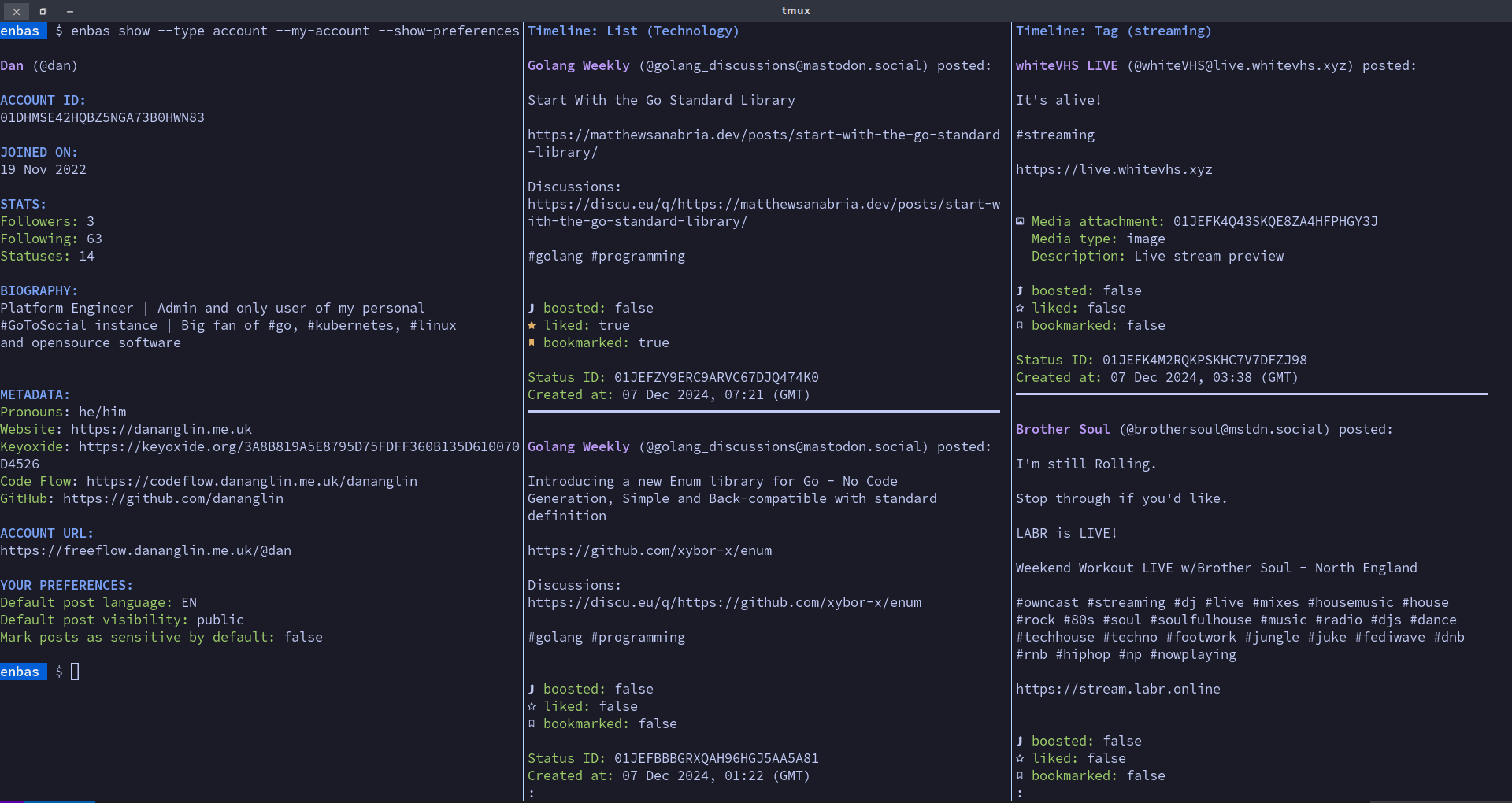
enbas is a CLI application that allows you to interact with your GoToSocial instance from your terminal. With enbas you can perform operations such as:
- reviewing your account information
- viewing, creating, deleting and boosting statuses
- viewing timelines
- viewing media attachments from statuses using your favourite media player
- viewing, following, and blocking accounts
- creating and voting in polls
- viewing, creating, editing and deleting your lists
- …and much more
Motivation
This project was created from the desire to interact with my GoToSocial instance and explore the Fediverse from the comfort of my own terminal emulator. This application is developed for those who use GoToSocial and spend most of their time in the terminal. If you like the idea of scrolling through your timelines in your favourite terminal emulator instead of a GUI or a browser then enbas might interest you.
Requirements
- Your favourite terminal emulator: For best results choose a modern terminal emulator such as Alacritty, Kitty, Foot, Ghostty or Wezterm. By default enbas uses ANSI colours so make sure your terminal is configured to use your favourite colour scheme.
- A nerd font: A nerd font is required to correctly display icons such as displaying the boost icon when viewing a status. Make sure you have a nerd font installed and that your favourite terminal emulator is configured to use it. See https://www.nerdfonts.com/ for more information about nerd fonts.
- A browser: A browser is needed for you to complete the login process and if you want to view certain resources in the browser such as an account or a status.
- A video player (optional): A video player is required if you want to play videos from media attachments.
- An image viewer (optional): An image viewer is required if you want to view images from media attachments.
- An audio player (optional): An audio player is required if you want to play audio from media attachments.
Development
This project is actively developed in Code Flow with
the main branch mirrored to Codeberg.
Licensing
The licensing information associated with each file is specified in the REUSE.toml file, but in general:
- All original source code is licensed under
GPL-3.0-or-later. - All documentation is licensed under
CC-BY-4.0.
Inspiration
This project was inspired by the following projects:
- madonctl: A Mastodon CLI client written in Go.
- tut: A Mastodon TUI written in Go.
- toot: A Mastodon CLI and TUI written in Python.
Installation guide
This project does not produce pre-built binaries in order to give you complete control when building and installing the application. The installation process is pretty simple and the guide below provides step-by-step instructions to help you out.
Build requirements
- go:
A minimum version of Go 1.25.4 is required for building
enbas. Visit https://go.dev/dl/ to download the latest version. - mage:
Mage is a build tool similar to
make. The project includes mage targets for building the binary, the man pages and the example configuration file. Visit https://magefile.org/ for instructions on how to install mage. - git (optional): Git is used to calculate the binary version and commit reference. This is optional as these values can be set manually via environment variables.
Obtain the source code
You can obtain the source code by cloning the repository or downloading the source code.
Clone the repository
You can clone the repository from Codeberg or Code Flow.
-
from Codeberg
git clone https://codeberg.org/dananglin/enbas.git cd enbas -
or from Code Flow
git clone https://codeflow.dananglin.me.uk/apollo/enbas.git
cd enbas
Download the source code
You can download the source code from Codeberg or Code Flow.
-
from Codeberg
curl -sL https://codeberg.org/dananglin/enbas/archive/main.tar.gz -o enbas-main.tar.gz tar xzvf enbas-main.tar.gz cd enbas -
or from Code Flow
curl -sL https://codeflow.dananglin.me.uk/apollo/enbas/archive/main.tar.gz -o enbas-main.tar.gz
tar xzvf enbas-main.tar.gz
cd enbas
Build
Build the binary and the manual using the following commands.
mage build
mage docs:manual
If you’ve obtained the source code by downloading the TAR archive and you want enbas to display the correct
build information, you’ll need to set the environment variables to specify the version and commit reference.
# example
export ENBAS_APP_VERSION="v0.3.0"
export ENBAS_APP_COMMIT_REF="8abfe5e9d32fe1a07c4d6907b64ca3eb34489bec"
mage build
mage docs:manual
Once the build is successfully you should see the __build directory containing the binary, the man pages and
the example configuration file.
$ tree __build/
__build/
├── bin
│   └── enbas
└── share
    ├── doc
    │   └── enbas
    │       └── examples
    │           └── config.json
    └── man
        ├── man1
        │   └── enbas.1
        ├── man5
        │   └── enbas.5
        └── man7
            └── enbas-topics.7

10 directories, 5 files
Install
You can install enbas system-wide or locally in your home directory.
System-wide installation
The below set of commands assumes that you want to install the binary within the /usr/local directory.
Don’t forget to use sudo if installing to /usr/local requires escalated privileges.
# install the binary
install --mode 0755 __build/bin/enbas /usr/local/bin

# install the man pages
install -D --mode 0644 __build/share/man/man1/enbas.1 /usr/local/share/man/man1/enbas.1
install -D --mode 0644 __build/share/man/man5/enbas.5 /usr/local/share/man/man5/enbas.5
install -D --mode 0644 __build/share/man/man7/enbas-topics.7 /usr/local/share/man/man7/enbas-topics.7

# install the example configuration file
install -D --mode 0644 __build/share/doc/enbas/examples/config.json /usr/local/share/doc/enbas/examples/config.json
Local installation
The below set of commands assumes that you want to install the binary within the ${HOME}/.local directory.
# install the binary
install --mode 0700 __build/bin/enbas ${HOME}/.local/bin

# install the man pages
install -D --mode 0600 __build/share/man/man1/enbas.1 ${HOME}/.local/share/man/man1/enbas.1
install -D --mode 0600 __build/share/man/man5/enbas.5 ${HOME}/.local/share/man/man5/enbas.5
install -D --mode 0600 __build/share/man/man7/enbas-topics.7 ${HOME}/share/man/man7/enbas-topics.7

# install the example configuration file
install -D --mode 0600 __build/share/doc/enbas/examples/config.json ${HOME}/.local/share/doc/enbas/examples/config.json
Verify
Run enbas from your terminal to verify that the installation was successful.
You should see the usage documentation.
You can also view the application’s build information by running enbas version.
Getting started
In this guide we are going to log into an account on a private GoToSocial server.
Follow along to log into your own account.
Create and edit your configuration file
The configuration for enbas is stored in a JSON formatted file.
The default path to the configuration file is set to $XDG_CONFIG_HOME/enbas/config.json.
If the XDG_CONFIG_HOME environment variable is not set then:
- on Linux the path will be set to
$HOME/.config/enbas/config.json. - on Darwin (MacOS) the path will be set to
$HOME/Library/Application Support/enbas/config.json. - on Windows the path will be set within the
%AppData%directory.
Alternatively you can use the --config top-level flag to specify a custom path to your configuration file.
Run the following command to generate your configuration file.
# Create a new configuration using the default path.
enbas create config
# Or create a new configuration using a custom path.
enbas --config /path/to/your/new/config.json create config
You can use the example configuration to help you edit your own.
You may recall that when installing the application you may have also generated and installed the example
configuration system-wide (at /usr/local/share/doc/enbas/examples/config.json) or locally within your home
directory (at ${HOME}/.local/share/doc/enbas/examples/config.json).
You can also find a copy on Code Flow
or on Codeberg.
For more details about the configuration options see the Configuration reference page.
For this ‘Getting Started’ guide you may want to specify your favourite browser in the configuration so that enbas can open the link to your instance’s authorisation page during the login flow. If you prefer to open the link manually then you can leave this field empty.
Log into your GoToSocial account
enbas uses GoToSocial’s Oauth2 authentication flow to log into your Fediverse account. Follow the below steps to complete the login process.
-
Run the following command to begin the login process. Use the
--urlto specify the URL of the instance that you want to log into. Use the--scopeflag to specify the scope of your access (e.g. read, write). You can use the--scopeflag multiple times to specify multiple scopes.enbas login --url gts.mydomain.example --scope read --scope write -
enbas will send a registration request to your instance and receive a new client ID and secret that it needs for authentication.
-
enbas will then generate a link to the consent form for you to access in your browser and print it to your terminal screen along with a message explaining that you need to obtain the
out-of-bandtoken to continue.The link will open in a tab in your preferred browser if you’ve specified it in your configuration. Alternatively you can manually open it yourself.
If the browser tab doesn’t open for you as expected you can still open the link manually.
-
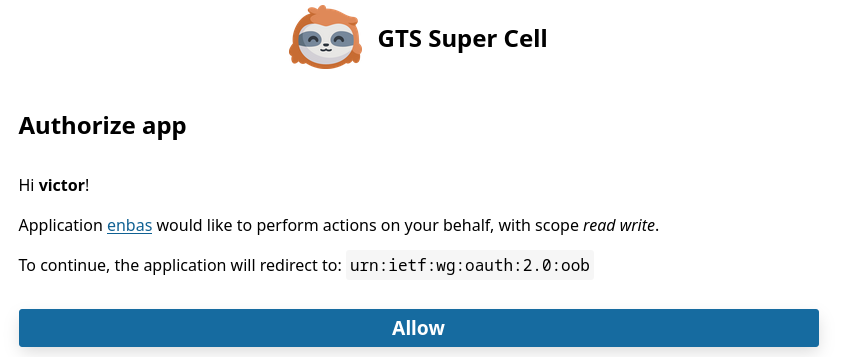
Once you’ve signed into GoToSocial in your browser, you will be informed that enbas would like to perform actions on your behalf with the scopes that you’ve specified earlier. If you’re happy with this then click on the big Allow button.
-
The
out-of-bandtoken from your instance will be displayed to you in your browser. Copy it and return to your terminal. -
Paste the token into the prompt and press
ENTER. enbas will then exchange the token for an access token which will be used to authenticate to your instance on your behalf. -
Finally, enbas will then verify the access token, save the credentials to the credentials file at the path specified in your configuration file, and inform you that you have successfully logged into your account.
Example login flow
$ enbas login --url super-cell.gts.enbas.private --scope read --scope write

You'll need to sign into your GoToSocial's consent page in order to generate the out-of-band token to continue with the application's login process.
Your browser may have opened the link to the consent page already. If not, please copy and paste the link below to your browser:

https://super-cell.gts.enbas.private/oauth/authorize?client_id=01C5TAJ1GC1HFH45BV3BNRSZ1M&redirect_uri=urn%3Aietf%3Awg%3Aoauth%3A2.0%3Aoob&response_type=code&scope=read+write

Once you have the code, please copy and paste it below.
Out-of-band token: NJVMZGMWZMUTNJDKZI0ZZJNLLWI3NDATYTNJYWE0MJBLOGI5
✔ You have successfully logged in as victor@super-cell.gts.enbas.private.
View your account information
You can verify that you have successfully logged in by viewing your account information by running enbas show account --my-account.
$ enbas show account --my-account

Victor (@victor)

ACCOUNT ID:
01XWASN1G5K23ZBYCZHR4KQS3C

JOINED ON:
24 Apr 2025

STATS:
Followers: 0
Following: 0
Statuses: 0

BIOGRAPHY:
Hey there, the name's Victor.

I've been a Platform Engineer in the Healthcare industry for 7 years and
counting. I love containerising anything and everything with #docker and #k8s,
and often find myself dabbling with #python, #golang and #rust.

In my free time I like to cook, blog about FOSS software news and make videos
documenting my travels across the UK.

METADATA:
Pronouns: he/him
Location: Hertfordshire, UK
Website: https://victor.me.private
Blogs: https://blogs.victor.me.private
Photos: https://photos.victor.me.private
Streams: https://streams.victor.me.private

ACCOUNT URL:
https://super-cell.gts.enbas.private/@victor

YOUR PREFERENCES:
Default post language: en
Default post visibility: public
Mark posts as sensitive by default: false
Configuration reference
Example configuration: See here at Codeberg or Code Flow
Config
| Field | Type | Description |
|---|---|---|
| aliases | map[string]string | A set of shortnames mapped to the enbas command. This section is managed by enbas. |
| credentialsFile | string | The absolute path to your credentials file. |
| cacheDirectory | string | The absolute path to the root cache directory. |
| lineWrapMaxWidth | number (integer) | The maximum number of characters on a line before that line breaks. This setting is used when displaying a timeline, your notifications, your bookmarks, the list of statuses from an account, etc. |
| gtsClient | GTSClient | The settings for the GTS Client. |
| server | Server | The settings for running enbas in server mode. |
| integrations | Integrations | Integration settings. |
GTSClient
| Field | Type | Description |
|---|---|---|
| timeout | number (integer) | The timeout (in seconds) for API requests made to your GoToSocial instance. |
| mediaTimeout | number (integer) | The timeout (in seconds) for requests made for retrieving media from your GoToSocial instance. |
Server
| Field | Type | Description |
|---|---|---|
| socketPath | string | The path to the socket file that the backend server binds to. This file is used for the communication between the enbas client and the enbas server. |
| pidPath | string | The path to the backend server’s PID file. When the server starts it writes its process ID to this file. The enbas client reads from this file when it is called to stop the backend server. |
| idleTimeout | number (integer) | The time (in seconds) that the backend server can remain idle before shutting down. This setting is only used when running the server without the --without-idle-timeout flag. |
| logger | ServerLogger | The settings for the server’s logger. |
ServerLogger
| Field | Type | Description |
|---|---|---|
| level | string | The server’s general logging level. The accepted values are debug, info, warn and error.By default the logging level is set to info. |
| path | string | The path to the file where the logger will write the logs to. If this field is empty, the logger will write to the console. |
Integrations
| Field | Type | Description |
|---|---|---|
| browser | string | The command to run for opening the browser for viewing URLs (e.g. the URL of a remote account). |
| editor | string | The command to run for opening your favourite text editor for creating or editing statuses. (THIS INTEGRATION IS NOT YET USED). |
| pager | string | The command to run for piping long outputs into your favourite pager. To disable paging, leave this field blank. |
| imageViewer | string | The command to run for opening your favourite image viewer for viewing image files from media attachments. |
| videoPlayer | string | The command to run for opening your favourite video player for playing video files from media attachments. |
| audioPlayer | string | The command to run for opening your favourite audio player for playing audio files from media attachments. |
Available operations
In this section of the documentation you can view all the commands that you can use with enbas. In this section, and as you interact more with enbas, you’ll come across the terms target, action and operation.
Target
A target is a resource that you can perform an action on. The target can be a GoToSocial resource (e.g. an account, a status or a timeline), or a local resource (e.g. your enbas configuration, your aliases or the usage documentation).
Action
An action is a built-in verb that describes the action to perform on a target.
For example, the command enbas show status --status-id 01AV6D5YIKKEWDTLXTGVTTRW9dCHOLGJ uses the action keyword
show to fetch and display the details of the status with the ID 01AV6D5YIKKEWDTLXTGVTTRW9dCHOLGJ.
Operation
An operation is the action that is performed on a particular target (e.g. create status), or the action performed on a target in relation to another target (e.g. add accounts to list).
You can view the targets that you can interact with under Available operations in the navigation menu. View the page of a specific target (e.g. status) for details on the operations you can perform on that target.
Top Level Flags
The top level flags below are available to all operations.
--config
The path to your configuration file.
Default: <empty>
--no-color
Disable the ANSI colour output when displaying the text on screen.
Default: false
access
The access target interacts with your access to your GoToSocial instance.
Below are the operations you can perform on the access target.
create access
This operation creates a new access to your GoToSocial instance. This is the operation you’ll use to log into your GoToSocial instance. Enbas will use the Oauth2 authentication flow for the login process which is described in the ‘Getting started’ guide. You can run this command multiple times to log into multiple accounts.
format
enbas [top level flags] create access [flags]
top level flags
See Top Level Flags
flags
--scope
The scope of access to your GoToSocial instance (e.g. read). This flag can be used multiple times to specify multiple values.
Default: <empty>
--url (required)
The URL of your GoToSocial instance.
switch access to account
This operation switches between your logged in accounts.
format
enbas [top level flags] switch access to account [flags]
top level flags
See Top Level Flags
flags
--account-name (required)
The name of the account to switch.
verify access
This operation verifies that you are authenticated into your GoToSocial instance and prints the name of the account that you are signed into.
format
enbas [top level flags] verify access [flags]
top level flags
See Top Level Flags
flags
None
account
The account target interacts with a local or remote account.
Below are the operations you can perform on the account target.
block account
This operation blocks a local or remote account.
format
enbas [top level flags] block account [flags]
top level flags
See Top Level Flags
flags
--account-name (required)
The name of the account to block.
find account
This operation searches for an account (remotely).
format
enbas [top level flags] find account [flags]
top level flags
See Top Level Flags
flags
--query (required)
The search query string.
--limit
The maximum number of items to display.
Default: 20
--restrict-to-following
Restrict the search to accounts that you are following.
Default: false
--resolve
Allow your instance to resolve the search by making calls to remote instances.
Default: false
follow account
This operation sends a follow request to the account you want to follow.
format
enbas [top level flags] follow account [flags]
top level flags
See Top Level Flags
flags
--account-name (required)
The name of the account to follow.
--notify
Get notifications whenever the account you want to follow posts a status.
Default: false
--show-reblogs
Show reblogs (boosts) from the account you want to follow.
Default: true
mute account
This operation mutes an account.
format
enbas [top level flags] mute account [flags]
top level flags
See Top Level Flags
flags
--account-name (required)
The name of the account to mute.
--duration
How long the effect should last for (set to 0s to last indefinitely).
Default: 0
--mute-notifications
Mute notifications as well as posts from the account.
Default: false
show account
This operation show a local or remote account.
format
enbas [top level flags] show account [flags]
top level flags
See Top Level Flags
flags
--account-name
The name of the account to show.
Default: <empty>
--browser
Show the account in your favourite browser.
Default: false
--exclude-reblogs
Exclude statuses that are reblogs (boosts) of other statuses.
Default: false
--exclude-replies
Exclude statuses that are replies to other statuses.
Default: false
--max-statuses
The maximum number of statuses to display.
Default: 20
--my-account
Specify your account to show.
Default: false
--only-media
Only show the statuses with media attachments.
Default: false
--only-pinned
Only show the account’s pinned statuses.
Default: false
--only-public
Only show the account’s public posts.
Default: false
--skip-account-relationship
Don’t show your relationship to the account that you are viewing.
Default: false
--skip-user-preferences
Don’t show your posting preferences when viewing your account information.
Default: false
--show-statuses
View the statuses from the account that you are viewing.
Default: false
unblock account
This operation unblocks an account.
format
enbas [top level flags] unblock account [flags]
top level flags
See Top Level Flags
flags
--account-name (required)
The name of the account to unblock.
unfollow account
This operation unfollows the account that you are curently following. If you have a follow request pending for the account in question, unfollowing that account will remove said follow request.
format
enbas [top level flags] unfollow account [flags]
top level flags
See Top Level Flags
flags
--account-name (required)
The name of the account to unfollow.
unmute account
This operation unmutes an account.
format
enbas [top level flags] unmute account [flags]
top level flags
See Top Level Flags
flags
--account-name (required)
The name of the account to unmute.
accounts
The accounts target interacts with one or accounts.
Below are the operations you can perform on the accounts target.
add accounts to list
This operation adds one or more accounts to a specified list.
format
enbas [top level flags] add accounts to list [flags]
top level flags
See Top Level Flags
flags
--list-id (required)
The ID of the list.
--account-name (required)
The name of the account to add. This flag can be used multiple times to specify multiple values.
remove accounts from list
This operation removes one or more accounts from a specified list.
format
enbas [top level flags] remove accounts from list [flags]
top level flags
See Top Level Flags
flags
--list-id (required)
The ID of the list.
--account-name (required)
The name of the account to remove. This flag can be used multiple times to specify multiple values.
alias
The alias target interacts with a custom command mapped to an operation.
Below are the operations you can perform on the alias target.
create alias
This operation creates a new alias. The new alias will be stored in your configuration file. You must not use a name from a built-in alias or an action keyword (e.g. show).
format
enbas [top level flags] create alias [flags]
top level flags
See Top Level Flags
flags
--name (required)
The name of the alias you want to create.
--operation (required)
The name of the operation.
delete alias
This operation deletes an existing alias. The alias will be deleted from your configuration file.
format
enbas [top level flags] delete alias [flags]
top level flags
See Top Level Flags
flags
--name (required)
The name of the alias you want to delete.
edit alias
This operation edits an existing alias.
format
enbas [top level flags] edit alias [flags]
top level flags
See Top Level Flags
flags
--name (required)
The name of the alias you want to edit.
--operation (required)
The name of the operation.
rename alias
This operation renames an existing alias. You must not rename the alias to a built-in alias or an action keyword (e.g. show).
format
enbas [top level flags] rename alias [flags]
top level flags
See Top Level Flags
flags
--old-name (required)
The old alias name.
--new-name (required)
The new alias name.
aliases
The aliases target interacts with the list of available aliases.
Below are the operations you can perform on the aliases target.
show aliases
This operation prints the built-in and your defined aliases.
format
enbas [top level flags] show aliases [flags]
top level flags
See Top Level Flags
flags
None
blocked-accounts
The blocked-accounts target interacts with the accounts that are blocked by you.
Below are the operations you can perform on the blocked-accounts target.
show blocked-accounts
This operation prints the list of the accounts that you are currently blocking.
format
enbas [top level flags] show blocked-accounts [flags]
top level flags
See Top Level Flags
flags
--limit
The maximum number of items to display.
Default: 20
bookmarks
The bookmarks target interacts with the statuses that you’ve bookmarked.
Below are the operations you can perform on the bookmarks target.
show bookmarks
This operation prints the list of the statuses that you have bookmarked.
format
enbas [top level flags] show bookmarks [flags]
top level flags
See Top Level Flags
flags
--limit
The maximum number of items to display.
Default: 20
config
The config target interacts with your configuration.
Below are the operations you can perform on the config target.
create config
This operation creates a new configuration file. The configuration file will be created using the default path unless the –config top-level flag is used.
format
enbas [top level flags] create config [flags]
top level flags
See Top Level Flags
flags
None
favourites
The favourites target interacts with the statuses that you’ve favourited (liked).
Below are the operations you can perform on the favourites target.
show favourites
This operation prints the list of statuses that you’ve favourited (liked).
format
enbas [top level flags] show favourites [flags]
top level flags
See Top Level Flags
flags
--limit
The maximum number of items to display.
Default: 20
filter
The filter target interacts with a single filter.
Below are the operations you can perform on the filter target.
create filter
This operation creates a new filter. By default, the new filter does not expire.
format
enbas [top level flags] create filter [flags]
top level flags
See Top Level Flags
flags
--title (required)
The title of the filter to create.
--filter-context (required)
The context in which the filter should be applied. This flag can be used multiple times to specify multiple values. The valid values for this flag are:
- home
- notifications
- public
- thread
- account
--filter-expires-in
The time from when the filter is created that it should expire.
Default: 0
--filter-action
The action to take when a status matches this filter. The valid values for this flag are:
- hide
- warn
Default: warn
delete filter
This operation deletes the specified filter.
format
enbas [top level flags] delete filter [flags]
top level flags
See Top Level Flags
flags
--filter-id (required)
The ID of the filter.
edit filter
This operation edits the specified filter.
format
enbas [top level flags] edit filter [flags]
top level flags
See Top Level Flags
flags
--filter-id (required)
The ID of the filter.
--title
The title of the filter to edit.
Default: <empty>
--filter-context
The context in which the filter should be applied. This flag can be used multiple times to specify multiple values. The valid values for this flag are:
- home
- notifications
- public
- thread
- account
Default: <empty>
--filter-expires-in
The time from when the filter is created that it should expire.
Default: 0
--filter-action
The action to take when a status matches this filter. The valid values for this flag are:
- hide
- warn
Default: <empty>
show filter
This operation prints the details of the specified filter.
format
enbas [top level flags] show filter [flags]
top level flags
See Top Level Flags
flags
--filter-id (required)
The ID of the filter.
filter-keyword
The filter-keyword target interacts with the text to filter within a filter.
Below are the operations you can perform on the filter-keyword target.
add filter-keyword to filter
This operation creates and adds a filter keyword to the specified filter.
format
enbas [top level flags] add filter-keyword to filter [flags]
top level flags
See Top Level Flags
flags
--filter-id (required)
The ID of the filter.
--keyword (required)
The text to be filtered.
--whole-word
The filter should consider word boundaries.
Default: false
delete filter-keyword
This operation deletes an existing filter-keyword.
format
enbas [top level flags] delete filter-keyword [flags]
top level flags
See Top Level Flags
flags
--filter-keyword-id (required)
The ID of the filter-keyword.
edit filter-keyword
This operation edits the specified filter-keyword.
format
enbas [top level flags] edit filter-keyword [flags]
top level flags
See Top Level Flags
flags
--filter-keyword-id (required)
The ID of the filter-keyword.
--keyword
The text to be filtered.
Default: <empty>
--whole-word
The filter should consider word boundaries.
Default: false
show filter-keyword
This operation prints the details of the specified filter-keyword.
format
enbas [top level flags] show filter-keyword [flags]
top level flags
See Top Level Flags
flags
--filter-keyword-id (required)
The ID of the filter-keyword.
filter-status
The filter-status target interacts with the status to filter within a filter.
Below are the operations you can perform on the filter-status target.
add filter-status to filter
This operation creates and adds a filter status to the specified filter.
format
enbas [top level flags] add filter-status to filter [flags]
top level flags
See Top Level Flags
flags
--filter-id (required)
The ID of the filter.
--status-id (required)
The ID of the status.
delete filter-status
This operation deletes an existing filter-status.
format
enbas [top level flags] delete filter-status [flags]
top level flags
See Top Level Flags
flags
--filter-status-id (required)
The ID of the filter-status.
show filter-status
This operation prints the details of the specified filter-status.
format
enbas [top level flags] show filter-status [flags]
top level flags
See Top Level Flags
flags
--filter-status-id (required)
The ID of the filter-status.
filters
The filters target interacts with the list of your filters.
Below are the operations you can perform on the filters target.
show filters
This operation prints the list of all your filters.
format
enbas [top level flags] show filters [flags]
top level flags
See Top Level Flags
flags
None
follow-request
The follow-request target interacts with the account that is requesting to follow you.
Below are the operations you can perform on the follow-request target.
accept follow-request
This operation accepts the request from the account that is requesting to follow you.
format
enbas [top level flags] accept follow-request [flags]
top level flags
See Top Level Flags
flags
--account-name (required)
The name of the account to accept.
reject follow-request
This operation rejects the request from the account that is requesting to follow you.
format
enbas [top level flags] reject follow-request [flags]
top level flags
See Top Level Flags
flags
--account-name (required)
The name of the account to reject.
follow-requests
The follow-requests target interacts with the list of accounts that are requesting to follow you.
Below are the operations you can perform on the follow-requests target.
show follow-requests
This operation prints the list of accounts that are requesting to follow you.
format
enbas [top level flags] show follow-requests [flags]
top level flags
See Top Level Flags
flags
--limit
The maximum number of items to display.
Default: 20
followers
The followers target interacts with the accounts who are following the specified account.
Below are the operations you can perform on the followers target.
show followers from account
This operation prints the names of the accounts that are following the specified account.
format
enbas [top level flags] show followers from account [flags]
top level flags
See Top Level Flags
flags
--account-name
The name of the account to show.
Default: <empty>
--limit
The maximum number of items to display.
Default: 20
--my-account
Specify your account to show.
Default: false
followings
The followings target interacts with the accounts who the specified account is following.
Below are the operations you can perform on the followings target.
show followings from account
This operation prints the names of the accounts that the specified account is following.
format
enbas [top level flags] show followings from account [flags]
top level flags
See Top Level Flags
flags
--account-name
The name of the account to show.
Default: <empty>
--limit
The maximum number of items to display.
Default: 20
--my-account
Specify your account to show.
Default: false
instance
The instance target interacts with the GoToSocial instance.
Below are the operations you can perform on the instance target.
show instance
This operation prints information about the GoToSocial instance that you have logged into.
format
enbas [top level flags] show instance [flags]
top level flags
See Top Level Flags
flags
None
list
The list target interacts with a single list.
Below are the operations you can perform on the list target.
create list
This operation creates a new list.
format
enbas [top level flags] create list [flags]
top level flags
See Top Level Flags
flags
--exclusive
Hide posts from members of this list from your home timeline.
Default: false
--replies-policy
The replies policy of the list to create. The valid values for this flag are:
- followed
- list
- none
Default: list
--title (required)
The title of the list to create.
delete list
This operation deletes an existing list.
format
enbas [top level flags] delete list [flags]
top level flags
See Top Level Flags
flags
--list-id (required)
The ID of the list.
edit list
This operation edits the specified list.
format
enbas [top level flags] edit list [flags]
top level flags
See Top Level Flags
flags
--list-id (required)
The ID of the list.
--exclusive
Hide posts from members of this list from your home timeline.
Default: false
--replies-policy
The replies policy of the list to edit. The valid values for this flag are:
- followed
- list
- none
Default: list
--title
The title of the list to edit.
Default: <empty>
show list
This operation prints the details of the specified list.
format
enbas [top level flags] show list [flags]
top level flags
See Top Level Flags
flags
--list-id (required)
The ID of the list.
lists
The lists target interacts with one or more lists.
Below are the operations you can perform on the lists target.
show lists
This operation prints the ID and the title of the lists that you’ve created.
format
enbas [top level flags] show lists [flags]
top level flags
See Top Level Flags
flags
None
media
The media target interacts with the media attached to the specified status.
Below are the operations you can perform on the media target.
show media from status
This operation downloads and opens the media attachment(s) from a status.
format
enbas [top level flags] show media from status [flags]
top level flags
See Top Level Flags
flags
--status-id (required)
The ID of the status.
--attachment-id
The ID of the media attachment. This flag can be used multiple times to specify multiple values.
Default: <empty>
--all-audio
Play all audio files from the status.
Default: false
--all-images
Show all image files from the status.
Default: false
--all-videos
Play all video files from the status.
Default: false
media-attachment
The media-attachment target interacts with a media attachment that you own.
Below are the operations you can perform on the media-attachment target.
create media-attachment
This operation uploads media from a file to the instance and creates a media attachment.
format
enbas [top level flags] create media-attachment [flags]
top level flags
See Top Level Flags
flags
--media-description
The description of the media attachment.
Default: <empty>
--media-file (required)
The path to the file of the media-attachment.
--media-focus
The focus of the media-attachment.
Default: <empty>
edit media-attachment
This operation edits the description and/or the focus of the media that you have created.
format
enbas [top level flags] edit media-attachment [flags]
top level flags
See Top Level Flags
flags
--attachment-id (required)
The ID of the media attachment.
--media-description
The description of the media attachment.
Default: <empty>
--media-focus
The focus of the media-attachment.
Default: <empty>
show media-attachment
This operation prints the details of a given media attachment. Note that you can only see the details of the media attachment that you have created.
format
enbas [top level flags] show media-attachment [flags]
top level flags
See Top Level Flags
flags
--attachment-id (required)
The ID of the media attachment.
muted-accounts
The muted-accounts target interacts with the accounts that are muted by you.
Below are the operations you can perform on the muted-accounts target.
show muted-accounts
This operation prints the list of accounts that you have muted.
format
enbas [top level flags] show muted-accounts [flags]
top level flags
See Top Level Flags
flags
--limit
The maximum number of items to display.
Default: 20
note
The note target interacts with your private note about an account.
Below are the operations you can perform on the note target.
add note to account
This operation adds a private note to the specified account.
format
enbas [top level flags] add note to account [flags]
top level flags
See Top Level Flags
flags
--account-name (required)
The name of the account to add.
--content (required)
The content of the note.
remove note from account
This operation removes the private note from the specified account.
format
enbas [top level flags] remove note from account [flags]
top level flags
See Top Level Flags
flags
--account-name (required)
The name of the account to remove.
notification
The notification target interacts with a single notification.
Below are the operations you can perform on the notification target.
show notification
This operation prints the details of the specified notification.
format
enbas [top level flags] show notification [flags]
top level flags
See Top Level Flags
flags
--notification-id (required)
The ID of the notification to show.
notifications
The notifications target interacts with multiple notifications.
Below are the operations you can perform on the notifications target.
clear notifications
This operation clears all your notifications.
format
enbas [top level flags] clear notifications [flags]
top level flags
See Top Level Flags
flags
None
show notifications
This operation prints the list of your notifications.
format
enbas [top level flags] show notifications [flags]
top level flags
See Top Level Flags
flags
--limit
The maximum number of items to display.
Default: 20
--exclude-notification-type
The type of notifications to exclude from the list. This flag can be used multiple times to specify multiple values. The valid values for this flag are:
- follow
- follow_request
- mention
- reblog
- favourite
- poll
- status
Default: <empty>
--include-notification-type
The type of notifications to include in the list. This flag can be used multiple times to specify multiple values. The valid values for this flag are:
- follow
- follow_request
- mention
- reblog
- favourite
- poll
- status
Default: <empty>
server
The server target interacts with the backend server.
Below are the operations you can perform on the server target.
start server
This operation starts the backend server.
format
enbas [top level flags] start server [flags]
top level flags
See Top Level Flags
flags
--without-idle-timeout
Start the server without an idle timeout.
Default: false
stop server
This operation stops the backend server.
format
enbas [top level flags] stop server [flags]
top level flags
See Top Level Flags
flags
None
status
The status target interacts with a single status.
Below are the operations you can perform on the status target.
add status to bookmarks
This operation adds the specified status to your bookmarks.
format
enbas [top level flags] add status to bookmarks [flags]
top level flags
See Top Level Flags
flags
--status-id (required)
The ID of the status.
create status
This operation creates a new status.
format
enbas [top level flags] create status [flags]
top level flags
See Top Level Flags
flags
--add-poll
Add a poll to the new status.
Default: false
--attachment-id
The ID of the media attachment. This flag can be used multiple times to specify multiple values.
Default: <empty>
--content
The content of the status.
Default: <empty>
--content-type
The type that the contents should be parsed from. The valid values for this flag are:
- plain
- markdown
Default: plain
--in-reply-to
The ID of the status that you want to reply to.
Default: <empty>
--language
The ISO 639 language code for this status.
Default: <empty>
--local-only
Do not federate the status beyond the local timeline(s).
Default: false
--media-description
The description of the media attachment. This flag can be used multiple times to specify multiple values.
Default: <empty>
--media-file
The path to the file of the media-attachment. This flag can be used multiple times to specify multiple values.
Default: <empty>
--media-focus
The focus of the media-attachment. This flag can be used multiple times to specify multiple values.
Default: <empty>
--not-boostable
Viewers will not be allowed to reblog (boost) the created status.
Default: false
--not-likeable
Viewers will not be allowed to like (favourite) the created status.
Default: false
--not-replyable
Viewers will not be allowed to reply to the created status.
Default: false
--poll-allows-multiple-choices
Allow viewers to make multiple choices in the poll.
Default: false
--poll-expires-in
The time from when the poll is created that it should expire.
Default: 86400
--poll-hides-vote-counts
Hide the vote count until the poll is closed.
Default: false
--poll-option
A poll option (use this flag multiple times to set multiple poll options). This flag can be used multiple times to specify multiple values.
Default: <empty>
--sensitive
Mark the status as sensitive.
Default: false
--summary
The summary of the status (a.k.a the subject, spoiler text or content warning).
Default: <empty>
--visibility
The visibility of the status. The valid values for this flag are:
- public
- private
- unlisted
- mutuals_only
- direct
Default: <empty>
delete status
This operation deletes a status that belongs to you. You can optionally save the text of the deleted status using the save-text flag if you wish to redraft it. If this is specified, the text of the deleted status will be written to a file within your cache directory.
format
enbas [top level flags] delete status [flags]
top level flags
See Top Level Flags
flags
--status-id (required)
The ID of the status.
--save-text
Save the text of the deleted status.
Default: false
favourite status
This operation favourites (likes) the specified status.
format
enbas [top level flags] favourite status [flags]
top level flags
See Top Level Flags
flags
--status-id (required)
The ID of the status.
find status
This operation searches for a status (remotely).
format
enbas [top level flags] find status [flags]
top level flags
See Top Level Flags
flags
--query (required)
The search query string.
--limit
The maximum number of items to display.
Default: 20
--account-name
The name of the account to find.
Default: <empty>
--resolve
Allow your instance to resolve the search by making calls to remote instances.
Default: false
mute status
This operation mutes the specified status to stop you from receiving future notifications for replies, favourites (likes), reblogs (boosts), etc from the status’ thread.
format
enbas [top level flags] mute status [flags]
top level flags
See Top Level Flags
flags
--status-id (required)
The ID of the status.
reblog status
This operation reblogs (boosts) the specified status.
format
enbas [top level flags] reblog status [flags]
top level flags
See Top Level Flags
flags
--status-id (required)
The ID of the status.
remove status from bookmarks
This operation removes the specified status from your bookmarks.
format
enbas [top level flags] remove status from bookmarks [flags]
top level flags
See Top Level Flags
flags
--status-id (required)
The ID of the status.
show status
This operation prints the details of the specified status.
format
enbas [top level flags] show status [flags]
top level flags
See Top Level Flags
flags
--status-id (required)
The ID of the status.
--browser
Show the status in your favourite browser.
Default: false
--show-who-favourited
Show the accounts who favourited (liked) the status.
Default: false
--show-who-reblogged
Show the accounts who reblogged (boosted) the status.
Default: false
unfavourite status
This operation unfavourites (unlikes) the status that you’ve previously favourited.
format
enbas [top level flags] unfavourite status [flags]
top level flags
See Top Level Flags
flags
--status-id (required)
The ID of the status.
unmute status
This operation unmutes the specified status so that you can start receiving future notifications for replies, favourites (likes), reblogs (boosts), etc from the status’ thread.
format
enbas [top level flags] unmute status [flags]
top level flags
See Top Level Flags
flags
--status-id (required)
The ID of the status.
unreblog status
This operation unreblogs (unboosts) the specified status.
format
enbas [top level flags] unreblog status [flags]
top level flags
See Top Level Flags
flags
--status-id (required)
The ID of the status.
tag
The tag target interacts with a single tag (hashtag).
Below are the operations you can perform on the tag target.
find tag
This operation searches for a tag.
format
enbas [top level flags] find tag [flags]
top level flags
See Top Level Flags
flags
--query (required)
The search query string.
--limit
The maximum number of items to display.
Default: 20
follow tag
This operation follows the specified tag.
format
enbas [top level flags] follow tag [flags]
top level flags
See Top Level Flags
flags
--tag-name (required)
The name of the (hash)tag.
show tag
This operation prints details of the specified tag.
format
enbas [top level flags] show tag [flags]
top level flags
See Top Level Flags
flags
--tag-name (required)
The name of the (hash)tag.
unfollow tag
This operation unfollows the tag that you are currently following.
format
enbas [top level flags] unfollow tag [flags]
top level flags
See Top Level Flags
flags
--tag-name (required)
The name of the (hash)tag.
tags
The tags target interacts with multiple tags (hashtags).
Below are the operations you can perform on the tags target.
show tags
This operation prints the list of the tags that you are following.
format
enbas [top level flags] show tags [flags]
top level flags
See Top Level Flags
flags
--limit
The maximum number of items to display.
Default: 20
thread
The thread target interacts with a status thread.
Below are the operations you can perform on the thread target.
show thread from status
This operation prints the context around the specified status.
format
enbas [top level flags] show thread from status [flags]
top level flags
See Top Level Flags
flags
--status-id (required)
The ID of the status.
timeline
The timeline target interacts with your timeline.
Below are the operations you can perform on the timeline target.
show timeline
This operation prints the list of statuses from a timeline.
format
enbas [top level flags] show timeline [flags]
top level flags
See Top Level Flags
flags
--limit
The maximum number of items to display.
Default: 20
--list-id
The ID of the list.
Default: <empty>
--tag-name
The name of the (hash)tag.
Default: <empty>
--timeline-category
The category of the timeline to show. The valid values for this flag are:
- home
- list
- public
- tag
Default: home
token
The token target interacts with details of an application token.
Below are the operations you can perform on the token target.
invalidate token
This operation invalidates the specified token which will remove it from your instance’s database. Once this token is invalidated, you will not be able to authenticate to your GoToSocial instancewith it.
format
enbas [top level flags] invalidate token [flags]
top level flags
See Top Level Flags
flags
--token-id (required)
The ID of the token to invalidate.
show token
This operation prints the details of the specified token.
format
enbas [top level flags] show token [flags]
top level flags
See Top Level Flags
flags
--token-id (required)
The ID of the token to show.
tokens
The tokens target interacts with a list of your tokens.
Below are the operations you can perform on the tokens target.
show tokens
This operation prints the list of the tokens that you have created.
format
enbas [top level flags] show tokens [flags]
top level flags
See Top Level Flags
flags
--limit
The maximum number of items to display.
Default: 20
usage
The usage target interacts with the usage documentation.
Below are the operations you can perform on the usage target.
show usage
This operation prints the usage documentation for a given target, operation or alias.
format
enbas [top level flags] show usage [flags]
top level flags
See Top Level Flags
flags
--target
The name of the target to show.
Default: <empty>
--operation
The name of the operation.
Default: <empty>
--alias
The name of the alias.
Default: <empty>
version
The version target interacts with the application’s build information.
Below are the operations you can perform on the version target.
show version
This operation prints the application’s build information.
format
enbas [top level flags] show version [flags]
top level flags
See Top Level Flags
flags
--full
Print the application’s full build information.
Default: false
votes
The votes target interacts with the votes(s) to the poll in a status.
Below are the operations you can perform on the votes target.
add votes to status
This operation adds your vote(s) to the poll in the specified status.
format
enbas [top level flags] add votes to status [flags]
top level flags
See Top Level Flags
flags
--status-id (required)
The ID of the status.
--vote (required)
The option in the poll to vote for. This flag can be used multiple times to specify multiple values.
Aliases
Aliases allows you to shorten and customise enbas commands to make the experience of using enbas more easier and familiar to you.
An alias is a custom command that is mapped to an operation. For example you can create an alias called “my-followers” to get the list of your followers by mapping it to “show followers from account –my-account”.
You can create, edit, rename and delete an alias using the alias target. For more details about the available operations available to the target run the command below:
enbas help --target alias
Your aliases are stored in your configuration file. It is possible to edit your configuration file to create and update aliases but you are encouraged to manage your aliases with enbas as it supports validating your aliases before saving the changes to your configuration file.
Built-in aliases
help
prints the usage documentation
This is an alias for show usage.
login
performs the login process for you to log into your GoToSocial instance
This is an alias for create access.
version
prints the application’s build information
This is an alias for show version.
whoami
prints the name of the account that you are signed into
This is an alias for verify access.
Validation
When creating or renaming an alias, enbas validates the name against the below validation rules before saving the alias to the configuration file.
- The alias name must be a single word with no spaces.
- The name must only contain alpha-numeric characters and hyphens.
- The name must be at least 3 characters long.
- The name must start and end with an alpha-numeric character.
- The name must not be a built-in action word (e.g. create).
- The name must not be a built-in alias.
If you create an invalid alias directly in your configuration file and attempt to use it, enbas will detect it and fail to perform the operation.
You can use the name of an existing target as an alias. For example you can create an alias called “lists” mapped to “show lists”.
Examples
- Create and use an alias to show the list of your aliases.
enbas create alias --name aliases --operation "show aliases" enbas aliases - Create and use an alias called “boost” to boost a status.
enbas create alias --name boost --operation "reblog status --status-id" enbas boost 01AV6D5YIKKEWDTLXTGVTTRW9dCHOLGJ - Create and use an alias called “fave” to like a status.
enbas create alias --name fave --operation "favourite status --status-id" enbas fave 01AV6D5YIKKEWDTLXTGVTTRW9dCHOLGJ - Create and use an alias to make a quick public toot.
enbas create alias --name toot --operation "create status --content-type plain --visibility public --content"
enbas toot "Hello, Fediverse 👋"
The time duration flag type
The time duration flag type is a custom flag type that allows you to specify a duration of time, for example specifying the expiry time on a newly created poll or how long you want to mute an account for. The time duration flag takes a string input and converts it into a duration of time. An example string input can be something like “3 days, 12 hours and 39 minutes” which the flag will convert into a time duration of 304,740 seconds. The time duration flag type can convert units in days, hours, minutes and seconds.
There are simple rules to follow to ensure that your input is converted correctly, such as:
- The string input must be wrapped in quotes.
- Use the keyword
dayordaysto specify the number of days. - Use the keyword
hourorhoursto specify the number of hours. - Use the keyword
minuteorminutesto specify the number of minutes. - Use the keyword
secondorsecondsto specify the number of seconds. - There must be at least one space between the quantity and the unit of time.
For example"7 days"is a valid input but"7days"is invalid.
Examples of valid string inputs
"3 days""6 hours, 45 minutes and 1 second""1 day, 15 hours 31 minutes and 12 seconds""(7 days) (1 hour) (21 minutes) (35 seconds)"
Example operations
- Mute an account for 30 minutes.
enbas mute account --account-name @bob@gts.social.example --duration "30 minutes" - Create a poll that will expire in 12 and a half days.
enbas create status --content-type plain \ --visibility public \ --content "Vim or Emacs" \ --add-poll \ --poll-option vim \ --poll-option emacs \ --poll-expires-in "12 days and 12 hours" - Expire an existing filter in 1 hour.
enbas edit filter --filter-id 01VZMFZ3KNGMWBX4HXGOCSJMQXFB4PGH \
    --filter-expires-in "1 hour"